GPT-Image-2 has quickly become one of the hottest names in AI image generation. Its biggest appeal is not only that it can create beautiful pictures, but that it understands prompts with impressive precision
But a perfect image is still only the first step. Seedance 2.0 can bring that image to life.
So what happens when GPT-Image-2 and Seedance 2.0 work together? You will get a powerful image-to-video AI workflow.
Why Combine Seedance 2.0 and GPT-Image-2?
GPT-Image-2: Precision in Visual Design
GPT-Image-2 excels at transforming text prompts into detailed, high-fidelity visuals. It can capture subtle lighting, material texture, and emotional tone, while supporting storyboard panels, character design, product shots, and UI mockups.
Seedance 2.0: From Static Images to Dynamic Video
Seedance 2.0 takes static images and turns them into coherent, cinematic short videos through its image-to-video mode. It ensures physical realism and natural camera movement, capturing subtle motion such as fabric folds, hair flow, and eye reflections. With first-and-last frame mode and full-reference mode, it maintains high consistency for characters, products, and environments.
Together: 1+1>2
When paired, GPT-Image-2 and Seedance 2.0 deliver high-fidelity AI video generation. The precision of static images from GPT-Image-2, combined with Seedance 2.0’s stable motion, enables creators to go from concept to finished video rapidly without complex workflows. This synergy supports AI video creation, fast prototyping, end-to-end generation, and brainstorm-to-video creative content.
How Does the Storyboard-to-Video Workflow Work?
Create a static visual with GPT-Image-2, then animate it with Seedance 2.0.
A practical workflow usually looks like this:
Use GPT-Image-2 to generate your visual assets. These could be product images, character sheets, storyboard panels, educational diagrams, cinematic scenes, or stylized IP visuals.
Upload the image into Seedance 2.0 and choose image-to-video mode. This is important because you want Seedance 2.0 to follow the existing image rather than create a completely new video from text.
Write a motion prompt. Describe who or what moves, how the camera moves, what emotion the video should express, and what should remain unchanged.
Storyboard image generated by GPT-Image-2:
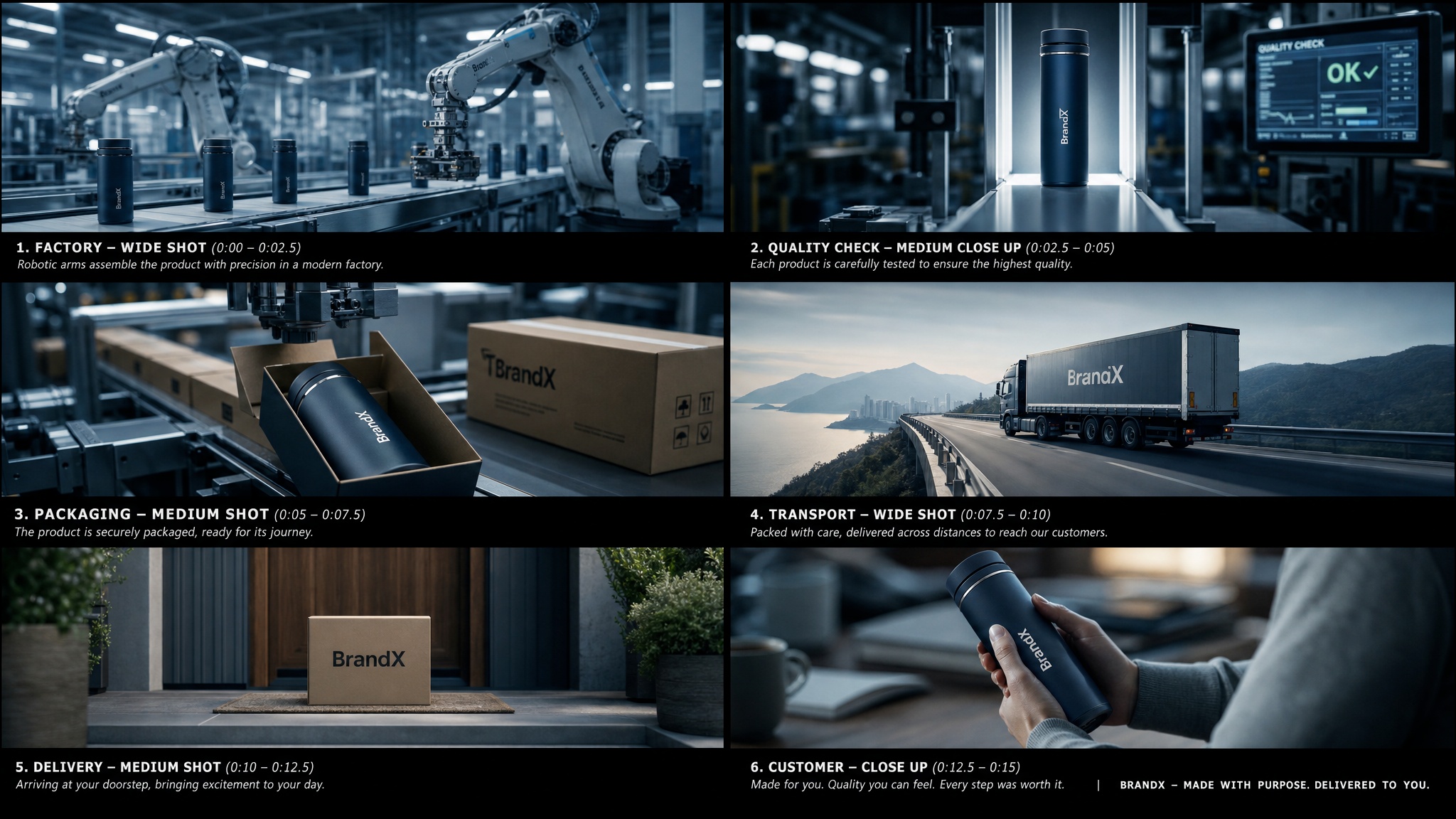
Story-to-Video generated by Seedance 2.0:
How Can Brands Create Better Ads?
Seedance 2.0 + GPT-Image-2 helps brands create product videos faster while keeping visuals consistent.
Brands often already have product photos, model shots, or campaign visuals. With GPT-Image-2, they can create new ad-style images quickly. With Seedance 2.0, they can turn those images into short product videos.
Product consistency is the most important rule. The product logo, shape, packaging, color, and texture should remain unchanged. For better results, keep the product mostly still and use camera movement, light movement, or background motion to create energy.This is useful for e-commerce ads, social media campaigns, fashion videos, beauty product showcases, gadget demos, and marketplace listings.
The key advantage is efficiency. Instead of renting a studio, booking a model, setting up lighting, and shooting multiple short videos, a brand can generate several video variations from static images. This allows faster creative testing and lower production cost.
Can AI Human Videos Feel Real?
Human-centered AI videos work best when motion, expression, and small details feel natural.
Realistic human video is difficult because viewers notice small mistakes immediately. A face can look perfect in a still image, but the illusion breaks if the eyes move strangely, the mouth shape feels wrong, or the body motion looks stiff.
This is where Seedance 2.0’s motion quality becomes important. It can help create smoother gestures, more natural camera movement, subtle facial expression, and believable body language. When GPT-Image-2 provides a strong first frame, Seedance 2.0 can add movement that gives the person more “life.”
This is useful for lifestyle ads, presenter-style videos, cinematic portraits, short drama clips, virtual influencers, and realistic social content.
How Can IP Creators Keep Style Consistent?
For IP re-creation and stylized content, consistency is the key to making AI video feel intentional.
Many creators do not just want one good clip. They want a repeatable style. This is especially important for original characters, mascots, brand IPs, animated worlds, game concepts, and social media series.
GPT-Image-2 can help create a consistent visual identity first. You can generate a character sheet, define the outfit, color palette, facial features, background style, and overall art direction. Then Seedance 2.0 can animate scenes based on that visual identity.
This makes the workflow useful for stylized storytelling, animated brand content, game demos, creator IPs, and character-driven short videos.
Top Tips to Improve Your AI Video Workflow
✅Use a two-step pipeline
Start with GPT-Image-2 for visual creation, then use Seedance 2.0 for image-to-video generation. This helps you first create a strong frame, then animate it with more control.
✅Build storyboard panels first
Create clear storyboard frames before generating the final video. This gives the video a stronger narrative direction instead of relying on the model to invent the full sequence from one prompt.
✅Keep visual references consistent
For characters, prepare front-view, side-view, and full-body references. For products, use a clean image with a clear shape, logo, color, and texture. This helps reduce character drift, product distortion, and scene inconsistency.
✅Write motion prompts with four key elements
Include subject action, camera movement, environment motion, and emotional tone. For example: “The camera slowly pushes in as the woman turns toward the window, her hair moves gently in the wind, and the mood feels calm and cinematic.”
✅Focus each short clip on one clear action
A 5-second AI video should usually show one main movement, not several complex ideas. Keeping the clip simple makes the motion smoother, more readable, and more cinematic.
Common AI Video Mistakes You Should Avoid
❌Using text-to-video instead of image-to-video
If you already have a strong image from GPT-Image-2, do not start from a pure text prompt. Use image-to-video mode so Seedance 2.0 can follow the visual foundation you have already created.
❌Forgetting to explain the storyboard order
If you upload a multi-panel storyboard, Seedance 2.0 may treat it as one single image unless you guide it clearly. Add a simple instruction such as:
“Follow the storyboard panels from left to right, top to bottom.”
❌Making the product move too much
Product videos often fail when logos, packaging, or surface textures are forced to rotate or deform. For product ads, keep the product stable and use camera movement instead, such as a slow push-in, pull-back, or orbit shot.
❌Skipping character reference images
Character consistency becomes weaker when there is no visual anchor. Use a character sheet or reference image, and repeat key details such as hairstyle, outfit, body type, facial features, and color palette.
❌Overloading one short clip with too many actions
A short AI video needs room to breathe. If you put too many scenes, movements, or transitions into one clip, the action becomes unclear. Keep each video focused on one main idea or one clear movement.
Seedance 2.0 + GPT-Image-2 opens the door to faster, cheaper, and more imaginative video production.
The real strength of Seedance 2.0 is that it makes motion feel more controllable and cinematic. When paired with GPT-Image-2’s precise image generation, the creative process becomes more complete: concept, image, storyboard, motion, and final video.
Seedance 2.0 is a strong place to start. Explore more Seedance 2.0 tutorials, learn how image-to-video prompting works, and try Seedance 2.0 AI Video Generator with your own storyboard or product image.
Your next cinematic AI video may begin with just one still frame.